
Special offer on professional printings!
Limited time offer: ends on April 22, 2024
Special offer!
Ends on April 22, 2024


Click this button on home page

Confirmation of your registration will be emailed to you to help you remember your username and password.
The system will offer you to begin your family tree.
As a member of YourFolks.com, you can:
If, in addition, you subscribe to a PREMIUM SERVICES plan, simple clicks will allow you to:
Finally, YourFolks.com's offers you to
Click this button on home page  (Top right)
Enter your username and password. You can ask for them if you've forgotten them.
The system will direct you to the section where you were during your last session
Click this button
 To disconnect (top right)
Click this button
 To disconnect
If you are inactive for too long, the system will automatically disconnect you.
You register as a new member but you try to use a username already reserved for someone else?
SOLUTION: Try to sign up with another username. For example, you can add your door number to the code you want to make it unique.
YourFolks.com's database contains
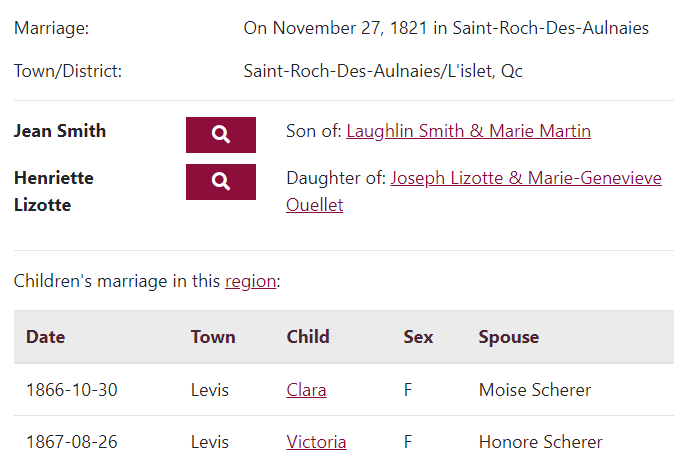
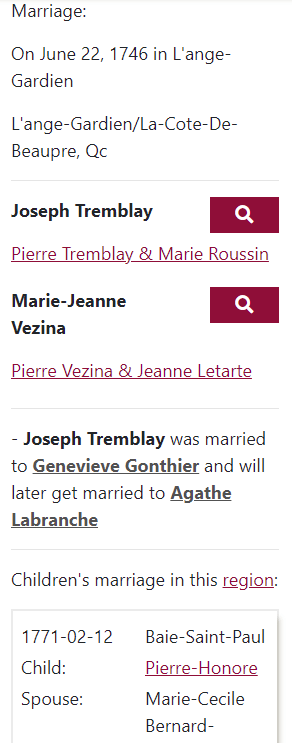
Each marriage has a family record (spouses, parents, former and future spouses, children who have married) and allows you to go back in time via hyperlinks
Each obituary identifies family kinship at the time of death and allows finding these people in YourFolks.com
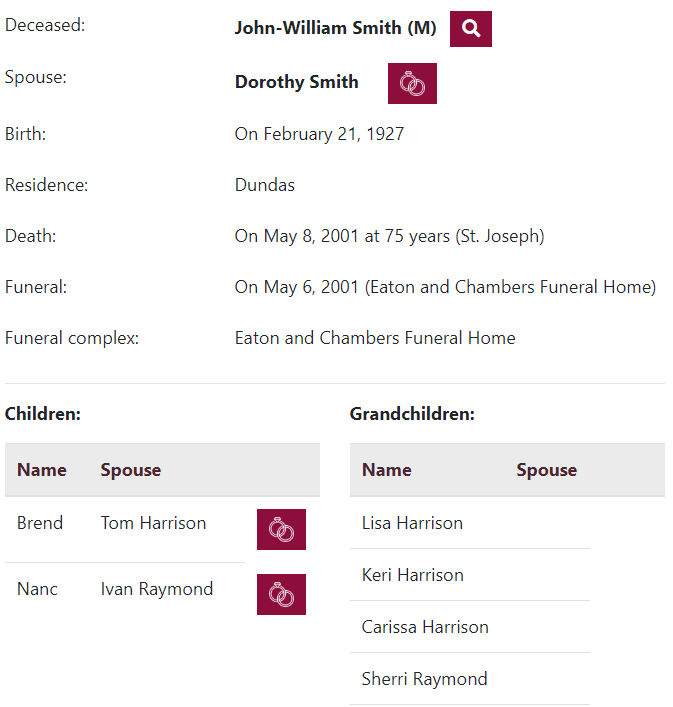
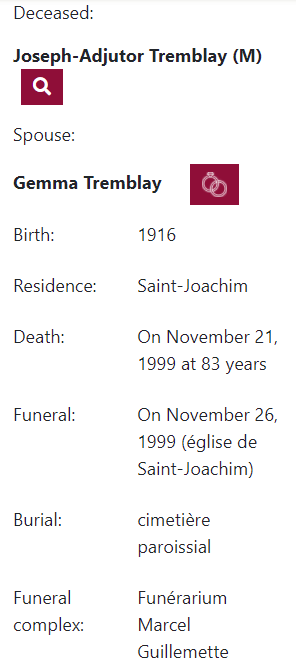
YourFolks.com has been developed in accordance with the best practices in the area of genealogical databases.
The data comes from reputable sources and has been subject to unparalleled quality control in genealogical databases of this scale on the Internet.
Several samples from our database were thoroughly checked to assess their quality. It turned out that YourFolks.com contains very few errors and that the links it presents between the various families are generally accurate. In fact, less than 1% of families were given a marriage that did not belong to them.
So you have a very reliable source of genealogical data!
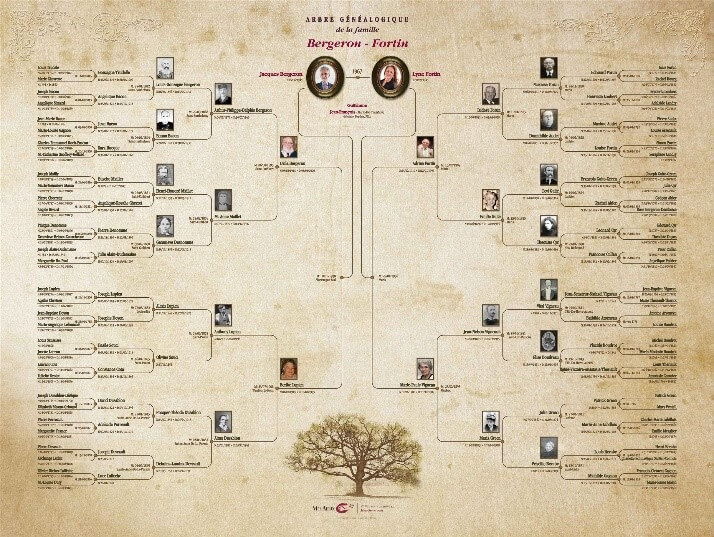
YourFolks.com offers you the opportunity to print your genealogy for free at home or to order a poster on high quality paper with a design made by professionals. Family books are also available.
To use this service, click on  in the toolbar of your family tree. You will be offered a preview first, then you can either print it for free at home or ask us send it to you in PDF to print it on large-format high-quality paper.
With the professional genealogy service, our experts make your genealogy according to the products offered. You will receive it a few weeks after payment in two versions. One in digital on the Internet. The other either in a PDF file or printed on high-quality paper ready to frame.
The genealogical information sought by our experts will include: the first and last name of the ancestors, the date and place of their marriage, the name and surname of their spouse. Only the ancestors of the subject are present. This means that neither the children of the subject, nor his marriage, nor the brothers and sisters of his ancestors will appear there.
You can request that YourFolks.com provide you with a short text on the history of the first ancestor in America and the origin of the surname. Different types of products are available and we guarantee a minimum number of ancestors for each product.
The research is done according to the rules of the art, and with the best sources available.
Most of the research focuses on North America, but we will do limited research in Western Europe. For any applications for Indian status, refer you to the appropriate authorities. The only information provided in a genealogy made by YourFolks.com that can give an idea of a person's origin is the place of marriage and his/her name.
You can pay for your orders
Payments by credit cards are safely managed by Moneris Solutions, an organization owned by the Bank of Montreal and the Royal Bank. It is the largest credit card processing company in Canada.
Cards accepted are Visa, Master Card, American Express and Discover
Orders made in Canada can be paid for by mail. To do this, you have to click on MAIL ORDER to get a mail order form with the details of the order and how to send your payment
In the family tree section,
Build your family tree for free and share it via the Internet or on paper with friends and family.
Invite your friends to collaborate, so you can exchange photos, anecdotes and information to enrich your family tree.
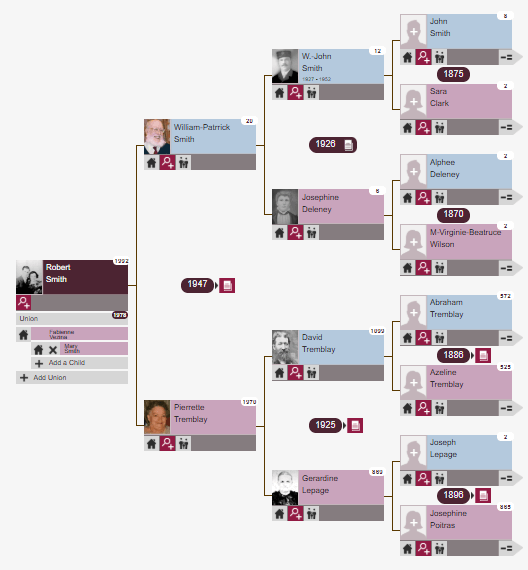
Your family tree can hold as many ancestors and photos as you like. Very easy to browse, with simple clicks, your tree will show, for each individual: the number of his/her ancestors in the tree, the year of his/her marriage and the name of his/her spouse, the name of his/her parents, and the presence of information about his/her birth, death or other unions.
In addition, an integrated search tool allows you to automatically find an ancestor in your tree, put it as the subject of your tree and see the members of its immediate family, or to know even more about that individual with his/her individual profile.
Individual Profiles
For each individual in your family tree, an individual profile can include photos, events that concern him/her and comments. It is automatically linked by simple clicks to the individual profiles of his/her immediate family (parents, children, brothers and sisters, spouses).
The individual profiles section also gives you access to all the pictures of your family tree.
Click on  in the menu. If you are not a member, the system will allow you to become one.
Provide information about you and your parents. All information provided is confidential. Your tree will only be accessible by you and the people you invite.
If the system can offer you ancestors automatically, it will do so. If not, it will ask you for information about your grandparents.

By clicking on this icon, a box for each parent will appear. Click on each of these boxes and provide information about the parent in question


Under the person at the left of your tree, you can add a union. You can also add children to it.

Automatically adds ancestors to a couple. If the system can't do it automatically, it offers you the help of an expert. And you can continue to automatically add ancestors by clicking on other magic wands.

When the system can add information to multiple locations in your tree, without any verification on your part, the magic button appears at the top of the toolbar. By clicking on it, you'll see what can be added and even make choices.

This toolbar icon places the main subject to the left and will show 3 generations of his/her ancestors

In a person's box. This person will be moved to the left

In a person's box. Shows up to 3 more generations of ancestors for this person. And you can repeat this as long as you want.

In the toolbar. Searches for a particular person.
You can drag your tree to move it around your screen.
Pictures are shown in 4 locations:
Add a photo in the tree

To add a person's photo to the family tree, simply click on that person's silhouette. Select the photo on your computer. Once the photo is uploaded, enter a short description, if desired.
Add photos to a profile
Access a profile by clicking on an individual's name in your family tree.

Click on the "Profile's pictures" icon to see the photos already associated with this individual.
Click add photos, select photos to download from your computer. Then, if desired, enter a short description and pick the appropriate picture type (ex. Marriage).
Delete, edit or move a picture
For any picture in a profile, you can change its description and type (e.g. marriage) by clicking on the picture
You can drag it to another position.
To delete pictures, select the one to delete by marking the boxes under each one. Then click "delete these pictures”. Please note that if you decide to remove an individual from the tree, all associated pictures will also be eliminated.
See all pictures

In the profiles, click on the "All pictures" icon. If desired, select the pictures to delete by marking the boxes under each. Then click "Delete these pictures”
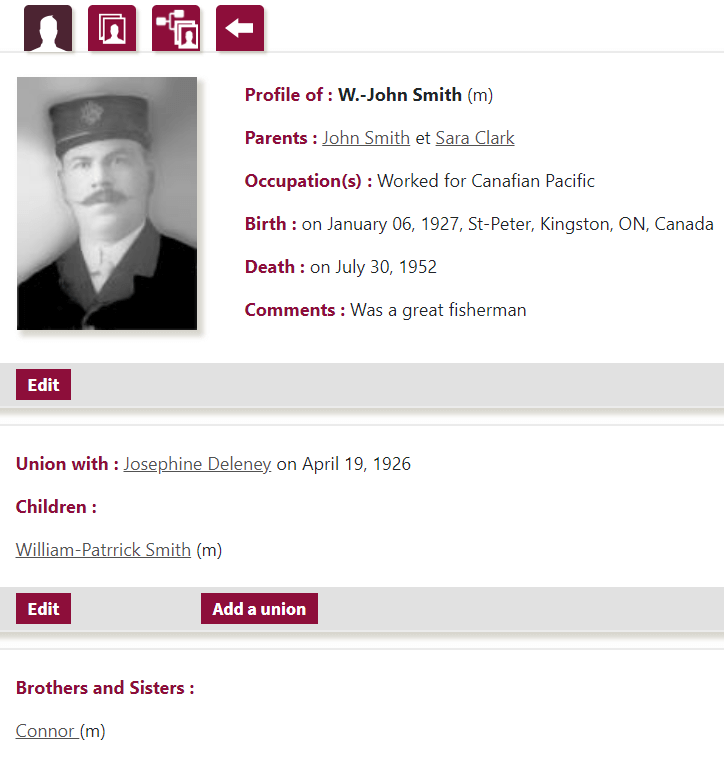
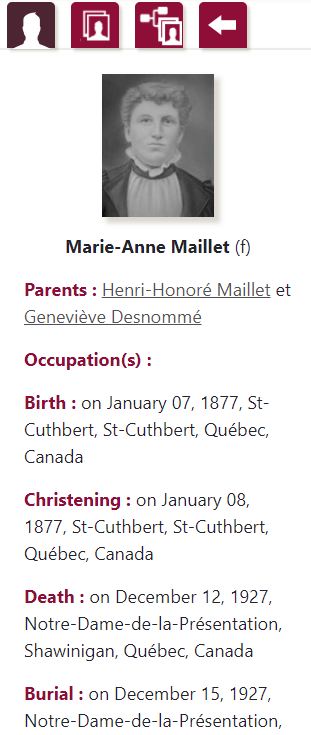
Each individual in your family tree has a profile that can contain information as detailed as wanted, about their parents, occupations, vital data (birth, baptism, death, burials), unions, children, siblings, comments and pictures.
You can access an individual's profile by clicking on his name in the family tree or on his name in another profile (e.g., by clicking on the name of an individual's father that is displayed in the person's card, you will get the father's profile)
Changing a profile

Click the first EDIT button. Make the desired additions or changes and then click 'Back to profile' or save your changes. You can even add comments about the individual (e.g., add anecdotes about the person).
Add/edit a union

Click the EDIT or ADD UNION in the Union section of a profile. Edit or give the information about the union and the spouse. You can even add information about children by clicking on ADD A CHILD.
Add a child

To add a child, the union of his parents must first be created. Then click EDIT, then ADD A CHILD.
Add a sibling
To add siblings to a person, add children to that person's parents.
You have worked on your family tree and you want to either show it on the Internet to your friends or ask your friends for help complete it. It's easy: invite them to collaborate.

Get a list of people you've already invited. To invite new ones, click ADD A GUEST. You can also delete guests if they don't have suggestions waiting for your decision.
Your guests will receive an email inviting them to visit your tree on YourFolks.com. They will be able to see the entire tree, pictures, individual profiles, etc. They can also make suggestions and share new pictures to add to your tree.
However, they will not be able to change the information in your tree at any time. You remain the only person authorized to make the changes. They also don't have access to your password or account information.

You can get a list of suggestions made by your guests and make decisions about them.
To send a second invitation to the same person
It is possible that one of your guests mispells or change the email giving them access to your tree. If so, go to your guest list, then click on the guest's name, make the change and clickon SEND AN INVITATION. Another email will be sent to give him/her access.
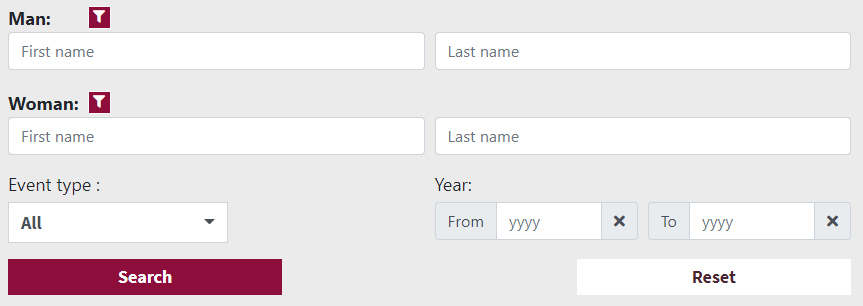
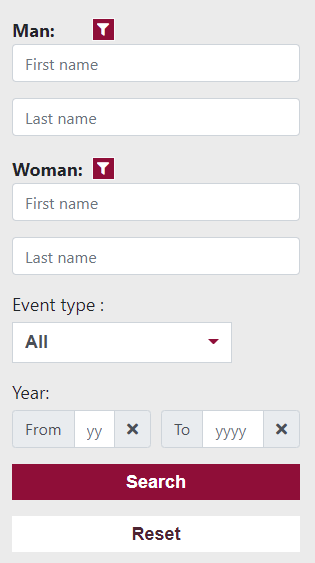
The only information you absolutely need is a person's last name and another name or surname. For example, look for all marriages where the husband's name is Gagnon, and the wife's first name is Mary.
The search engine will view all types of events (e.g. births, marriages, deaths) that meet your criteria
You can also restrict your search to reduce the number of results obtained:
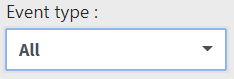
If you are only interested in certain types of events (e.g. births and marriages), you can choose one or more
You can also indicate the period you are interested in. If you mention only one year, the research will be limited to that year
Additional criteria
To see how to further narrow the list of results, see Advanced Searches
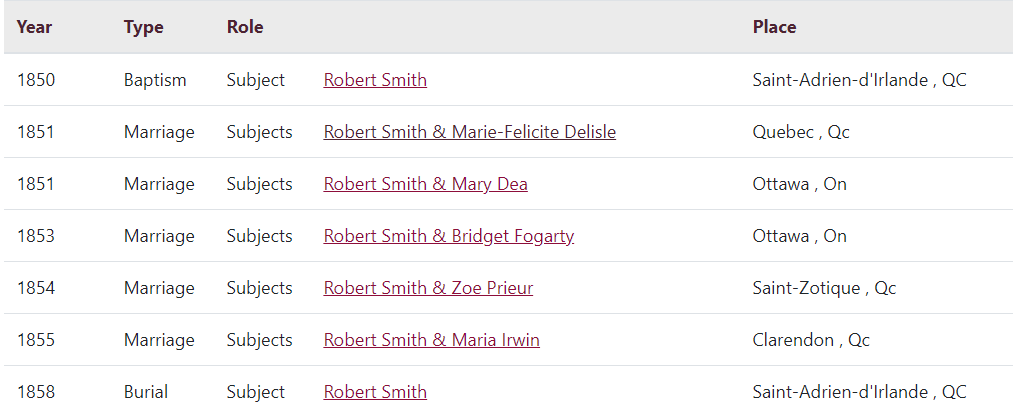
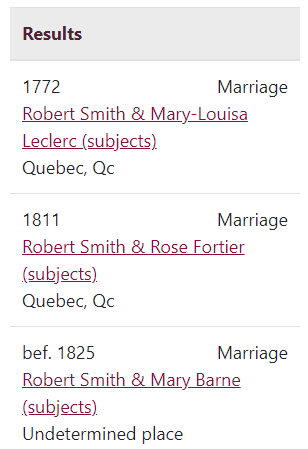
Roles
Subjects of a wedding : the couple who got married
Subject of a baptism or burial : the person baptized or deceased
Parents of a baptism, marriage or burial : the couple is a parent of the child, or the deceased had that
By clicking on a wedding, you will get a family record, showing the couple, their parents, the previous and next spouses, as well as the children who have married. You will be able to go back in time using the hyperlinks.
By clicking on the other events, you will get a detailed fact sheet of this event. From this sheet, you can ask the system to automatically do some search for you. For example, finding a child's marriage from the child's baptism.
Change your search

You can, change the criteria of your search, if the list of results does not suit you

If you know anything about the man and/or woman, click on his filter.

Each filter allows you to add information you know about that person or that couple.
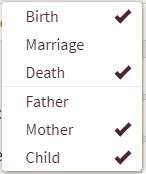
You can choose an event or a parent on which you can give information
For each event selected, the system gives you the opportunity to enter information about its date and/or location. For example:

The place can be a municipality, a province (or a state) or a country.
For each parent selected, the system allows you to enter the first name and/or name. For example:

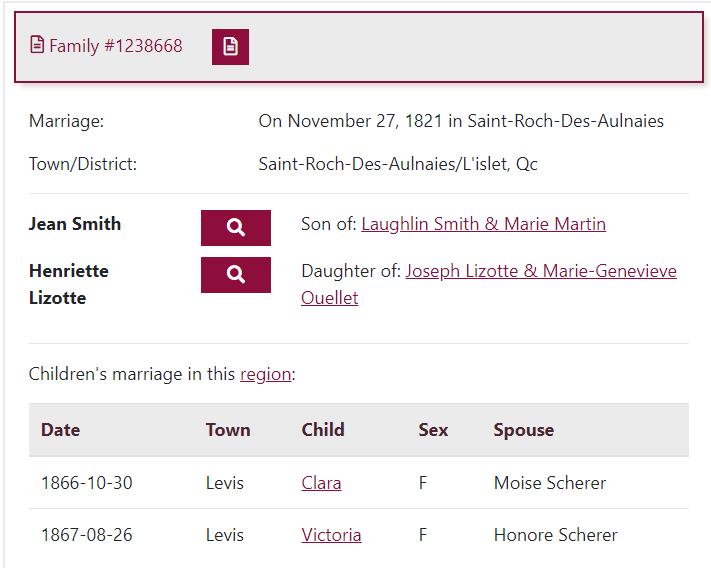
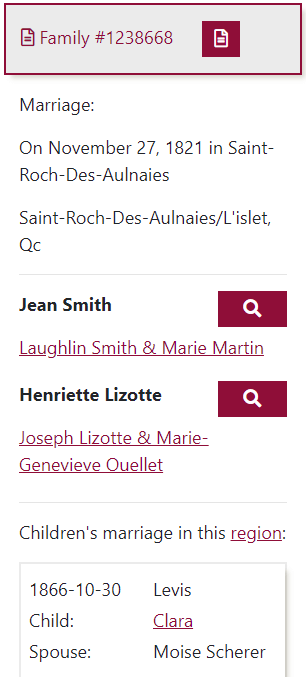

Ask for the image of the wedding

Search for more information about a person
Hyperlinks : Get a couple's family profile
Only married children appear in the family record.
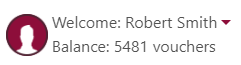
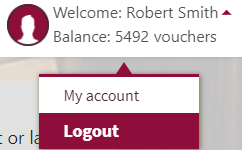
At the top right of your screen, the system indicates that you are connected by mentioning your name and the number of vouchers you have left.
After clicking on it, you can see the details of your account by clicking on MY ACCOUNT

After clicking on it, you can see the details of your account by clicking on MY ACCOUNT
You will then get a menu with an information area to its right. Each time you click on an item in the menu, you'll see the corresponding information area.
You will then get a menu with an information area under each item.
For example
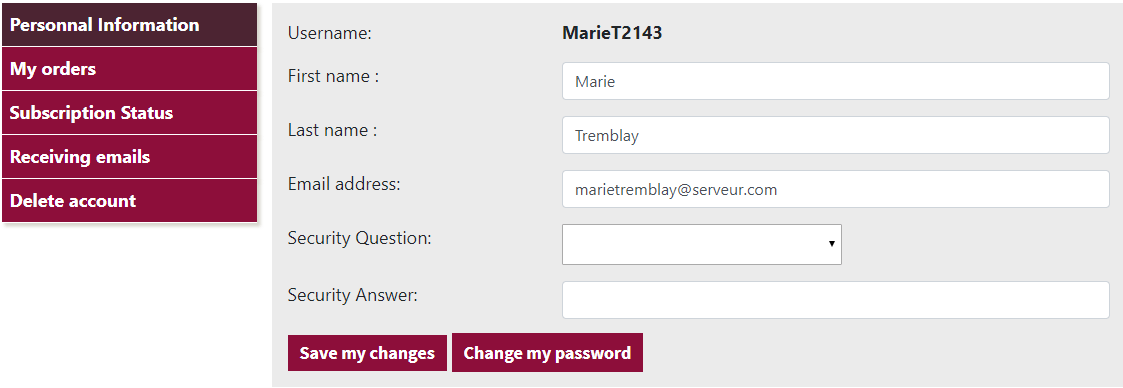
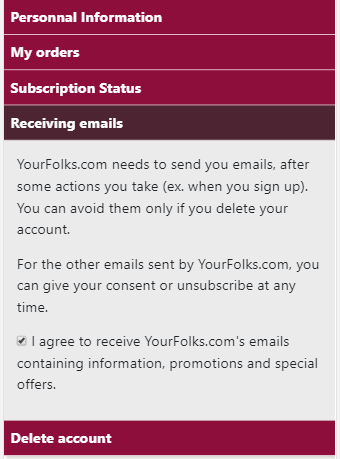
The information you can change is:
PRIVACY STATEMENT
Protection of personal information
J. T. Recherches Inc., operator of this website (the site), recognizes the confidentiality of information that may be disclosed by members as part of the registration process or when making purchases through our website, and makes a firm commitment to protect your right to privacy. The following describes the information collection and dissemination practices we apply to this website.
Overview
Personal information is that provided to J. T. Recherches Inc. at the time they register or when they change their account, or when they make a purchase, and does not include the content added in the Family Tree section.
In addition, content added by a member in the Family Tree section is not considered to be part of the personal information for the purposes of this policy and automatically becomes the property of YourFolks.com, who may use it as it sees fit for genealogical purposes.
Personal information is not shared with third parties except our payment server, email server, and in rare cases where there is a possibility of violation of our usage policies, applicable laws or other laws. We collect certain data, always in circumstances where you are aware of it and with your consent, that we use to execute the orders.
Demographic information collected through surveys in which the user participates in viewing the site could be used as aggregate statistical data to attract potential sponsors.
Consent
Except as permitted by law, personal information is collected only if your consent is obtained prior to collection, use and dissemination. However, we may seek permission to use and disclose personal information after it has been collected when we wish to use it for a new or different purpose and to which you have not already consented.
When you provide personal information on this website, you authorize us to collect, use and disclose all personal information about you in accordance with this policy. In addition, specific authorizations or consents may be required from time to time.
In most cases, subject to legal or contractual restrictions, you are free to refuse or withdraw your consent at any time with reasonable notice. However, please note that in certain circumstances, products or services can only be offered or provided if you provide personal information. Therefore, if you choose not to provide us with the requested personal information, we may not be able to offer you or provide you with the requested products or services.
Some more specific aspects of our privacy policy are best described in the answers to the often asked questions listed below:
Does YourFolks.com ask for personal information?
Yes. YourFolks.com wants a limited amount of personal information when you want to become a member, or when you make purchases (for example, the purchase of packages). We may ask for similar information on other occasions, such as when you participate in a competition or other promotions sponsored by YourFolks.com and/or one of our partners.
When applying for credit card payments, you provide your credit card number directly to our payment server, so YourFolks.com is never aware of this information.
How does YourFolks.com use my personal information?
Our goal is to provide you with a web experience that is as personalized, relevant and user-friendly as possible. Your personal information is primarily used to effectively provide you with the relevant information or services.
YourFolks.com will also use your personal information to let you know about new features or other YourFolks.com offerings that may be of interest to you, or to meet customer service needs and demands.
YourFolks.com does not engage in any form of sale, rental or distribution of the personal information you provide us.
Will YourFolks.com disclose my personal information to third parties?
YourFolks.com refrains from disclosing your personal information, except in circumstances where you are aware of it and give your consent, or in the manner described in this policy or as required by law or to protect the rights or property of YourFolks.com.
There are other circumstances where limited disclosure of personal information is expressly indicated when the data is collected, such as in the case of the user agreement or in the rules of a competition or other promotions. In this way, you control the type of information you disclose, if any.
YourFolks.com reserves the right to disclose comprehensive user statistics, including making disclosures such as "50 percent of our users are women" or "50 percent of our users went to university," to describe our services to potential partners or advertisers and other third parties.
In addition, if you click on a link that takes you out of YourFolks.com's site to get you to visit the website of a third-party advertiser or sponsor, you may be asked for credit card information or other personal information to make a purchase or use of the products and services offered. These companies have their own privacy practices and data collection practices. YourFolks.com assumes no responsibility for these independent policies. Therefore, you are asked to consult carefully with the privacy policies of these third parties if it is important to you to know how your information will be used.
Where does YourFolks.com store my information?
Currently, the location where YourFolks.com stores personal information is in the province of Quebec, Canada.
Will YourFolks.com use my information to solicit me by mail?
YourFolks.com will send you emails to inform you of any changes or additions that have been made to YourFolks.com site, or related products and services. It will send you emails to tell you what you can do to add information to your Family tree. Occasionally, it will send you emails for special discounts.
Can I refuse to provide personal information to YourFolks.com?
Visitors can become members of YourFolks.com by providing only their name, first name, email address and choosing a username and password. To buy additional services, you need to give information relevant to billing.
How does YourFolks.com protect my information?
YourFolks.com and its Internet host strive to maintain appropriate physical devices, procedures and technical security measures for its offices and information storage facilities to prevent losses, malicious use, unauthorized access, disclosure or modification of personal information. We also apply these methods to our efforts to dispose of or destroy personal information.
Moreover, YourFolks.com protects personal information by allowing access to it only to our staff who needs to know about it in order to be able to provide our products or services.
Can I access and review my personal information held by YourFolks.com?
YourFolks.com grants you the right to access and review the personal information it holds about you using the "My Account" section of the site and with each purchase.
Does YourFolks.com use "IP addresses"?
We don't use your IP address and we save it nowhere.
YourFolks.com's cookies
Cookies do not extract private or personal information from your computer's memory. Their only use by YourFolks.com is to allow you to help you navigate effectively in YourFolks.com.
Contests and promotions
YourFolks.com may occasionally launch contests or other special promotions on our site where members or visitors are asked for contact information (such as an email address) or demographic information (such as zip code, age or salary scale). We use this data to send you promotional material about our company or our partners. We will also use your contact information to contact you as required and may share these contact information with other companies for promotional purposes, but only with your prior authorization and the conditions given to you at the time you take part in the promotional event.
Communications via the website
If you have any questions about this privacy statement, the practices of this site, access to your personal information or your operations related to this website, please email us at admin@yourfolks.com.
The following summarizes the terms of use of YourFolks.com. However, the text of the agreement (shown below) prevails for legal purposes.
Privacy
YourFolks.com has a privacy policy regarding member information. This policy is available by clicking here.
Limited Use License
YourFolks.com allows you to use the content only to conduct genealogical research in a personal or professional capacity, and you can only download items of content that are relevant to that search.
Membership
When the use of YourFolks.com requires membership, it is up to the member to ensure that no one else can use his/her membership.
Additional services
YourFolks.com allows free use of certain services. Other services, described as complementary, require the payment of user fees. YourFolks.com is free to change the list of paid and complementary services, as well as the packages and fees associated with them.
Payments
Payment by credit card plans entitles you to use the corresponding services as soon as payment is accepted. When payment is made by mail, corrsponding services are made available when payment is successfully received.
Emails
The member agrees that YourFolks.com send him e-mails of information and promotions. To stop receiving these emails, he/she must cancel the registration or click "unsubscribe" in promotional emails or indicate it in the MY ACCOUNT section.
Cancellation
Members can cancel their membership online by going to the MY ACCOUNT section. No refunds will be made. Content entered by the member in the Family Tree section will remain available for YourFolks.com, who may use it in accordance with its privacy policy.
Data quality
YourFolks.com is working hard to ensure the quality of its data. Given the size of the database (more than 100 million people),however, it may contain some errors, despite a very elaborate quality control process.
Modification to Terms
YourFolks.com reserves the right to amend these conditions as it sees fit.
AGREEMENT TO YOURFOLKS.COM
1. Definitions
Unless otherwise mentioned, the following definitions apply to the whole agreement:
2. Users and members responsibilities
2.1 Limited Use License
This license allows you to use the content only to conduct genealogical research in a personal or professional capacity, and you can only download items of content that are relevant to that search.
You cannot use the content for any other purpose. The downloading of all or important sections of a work or database is prohibited. The resale of a work or a database, or part of it, except for the results of a search for a particular person, is prohibited.
Live publication or other new content publication is prohibited, except as unique data elements that are part of a family history or a single genealogy. A new authorized publication of the content must include a reference to J. T. Recherches Inc. You may not copy, reproduce, publish or distribute content in any way or for any other reason without our prior permission.
Any form of use, copy, reproduction, display, publication or distribution of content that is not expressly permitted under these provisions may violate copyright laws, trademarks and other laws. Failure to comply with this license may result in the immediate cancellation of your membership and result in legal action against you. We reserve the right to prevent you from continuing to access services if you fail to comply with the agreement.
2.2 Use by minors
If you are a minor, you cannot access or use the service unless you
2.3 Continuous knowledge and acceptance of the agreement
When you use the service, you indicate that you accept and understand this agreement and our privacy policy. If you do not agree to be bound by this agreement, you should not use the service.
We reserve the right to revise the agreement at any time by updating this text. Please check this page periodically to see the updated version of the agreement. If you continue to use it after a change has been made, it indicates that you accept this change. If you don't want to be bound by a change, you should stop using the service.
2.4 Registration and security
As part of the registration process, you will need to choose a password and username. You must also provide J. T. Recherches Inc. with accurate, complete and up-to-date information that it will use to register. Failure to provide this information may result in a breach under this agreement.
You acknowledge that you are prohibited (i) from choosing or using another person's name for the purpose of impersoning that person, (ii) from using the rights of another person without authorization or (iii) to use a name that we deem in poor taste, at our absolute discretion.
You must notify us immediately by regular mail or email, at the address admin@yourfolks.com, as soon as you notice or suspect one or more unauthorized uses of your account or circumvent security measures, including loss, theft or unauthorized disclosure of your password or credit card information. You are responsible for maintaining the confidentiality of your password. You will never be asked to reveal your password to a YourFolks.com representative or agent or its owners or agents, except when cancelling your membership.
You are responsible for any form of use of YourFolks.com, or activities that are carried out there, as a result of access through the password attached to your account. The distribution of your password to third parties to allow them to access YourFolks.com is expressly prohibited and will constitute a breach of this agreement. Any activity of a fraudulent, abusive or otherwise illegal nature may result in the closure of your account, at our sole discretion, and your case may be referred to the relevant law enforcement authorities.
2.5 Location of Operations
YourFolks.com is operated in Canada. When you register as one of its members, the information about you as a customer is stored and processed in Canada and you give your express consent, through your participation in the registration and underwriting process, to that storage and processing in accordance with our privacy policy. We recommend that you check this information regularly and correct it.
2.6 Emails
The member agrees that YourFolks.com sends him e-mails of information and promotions. To stop receiving these emails, they must cancel their registration or click "unsubscribe" in promotional emails or MY ACCOUNT.
3. YourFolks.com responsibilities
3.1 Quality of service
YourFolks.com strives to ensure a good quality of its service, especially in terms of availability and response time.
3.2 Content quality
YourFolks.com has processes in place to provide its users with quality content.
3.3 Privacy
YourFolks.com has a privacy policy. and it is part of this agreement.
3.4 Beginning of packages
Payment of credit card plans entitles you to use the corresponding services as soon as payment is accepted. When payment is made by mail, package services are made available after payment is successfully cashed by YourFolks.com.
3.5 Receipts
When making a credit card payment, YourFolks.com produces an internet page with a receipt and sends you a copy by email. YourFolks.com delivers no further receipts and is not responsible for the delivery of this email.
When paid by mail, no receipts will be issued by YourFolks.com.
3.6 Limited liability
While we makany e the necessary efforts to ensure the accuracy and quality of our services and data, they are provided "as is" and (i) we assume no responsibility for any use of the service or content, or the reliability of the service, any interruption or delay in their delivery and (ii) do not make any statement or guarantee as to the accuracy of the service or , reliability, completeness, completeness or punctuality or quality of services or content, whether it is up-to-date or error-free, or its compatibility, security or adaptability for a particular purpose.
Services may not be available at any time. Changes are made periodically to the information contained here. We and our third-party suppliers do not make statement, guarantee or attach conditions, express or implied, of any kind, including statements, guarantees or conditions regarding market quality, adaptability to a particular purpose or absence of infringement, with respect to service or content.
Our liability for damages incurred as a direct result of our failure to comply with the agreement is limited to the total amount paid to us by the member under the agreement in the twelve (12) months prior to the date the default occurred.
Despite the above, we cannot assume any liability under any circumstances for damages (including indirect, incidental, special or subsequent damages, loss of profits, loss of income, commercial or economic losses, loss, corruption or damage to data, systems or programs or due to interruption of operations) of a contractual nature. , tortious (including negligence) or other (even if such loss or damage was notably foreseeable or known), arising from the use or inability to use this site or its contents, or damage that is the direct or indirect consequence of a gesture you take in relation to the content, or a gesture you take based on the content , even though we have been notified of the possibility of such damage.
3.7 References
YourFolks.com may occasionally give its users the opportunity to link to or purchase third-party services. The sites of these third parties may be subject to terms that differ from those set out here. J. T. Recherches Inc. does not make a statement, provide guarantees or attach conditions to products or services offered by third parties, assumes no liability for or endorses them, and you commit yourself to make any claims to the third-party provider in the event of dissatisfaction or problem with those products or services, and not with J. T. Recherches Inc.
4. Property rights
Copyright for all free-to-air content or subscriber-only content, as well as all other intellectual property rights related to the service, belong to J. T. Recherches Inc.
Content entered by the member in the Family Tree section will remain available for YourFolks.com, who may use it in accordance with its privacy policy.
Some of the words, phrases, names, concepts or logos used in the site may be protected as trademarks, service marks or trade names of J. T. Recherches Inc. or other entities. Nothing in this site can be construed as conferring a license or right to use a trademark, logo or concept displayed on this site without the express written permission of J. T. Recherches Inc.
5. Changes to this agreement and service
J. T. Recherches Inc. has the discretion to amend this agreement or service at any time to reflect service changes, legislative changes or any other reason that J. T. Recherches Inc. may consider valid at any time. Changes to the service will be listed on the website YourFolks.com or will be emailed to you.
If you feel that part of this agreement or an amendment to it or service is unacceptable or requires you to no longer comply with the agreement, you can cancel your plan in accordance with Clause 2.3. When you continue to use the service now or after notices have been posted indicating that changes have been made to this agreement, this means that you have accepted the changes and are bound by them.
We will send you an email informing you of any significant changes or additions that have been made to the content or service, or informing you of related products and services that we believe may be of interest to you.
6. Cancellations
6.1 Cancellation by a member
Members can cancel their membership online by going to the MY ACCOUNT section. No refunds will be made. Content entered by the member in the Family Tree section will remain available for YourFolks.com, who may use it in accordance with its privacy policy.
6.2 Cancellation by YourFolks.com
YourFolks.com can cancel the membership of any member who does not comply with the terms of the agreement. He then notifies the member by email.
6.3 Consequences of a cancellation
When cancelled, all services associated with the membership of the member involved are cancelled, even if these services include packages.
Whether due to a cancellation by the member or by YourFolks.com, there will be no refund.
7. Disposal
J. T. Recherches Inc. reserves the right to cede or transfer its rights and obligations under this agreement to anyone who undertakes to assume and comply with all of the obligations set out in this agreement. Since this agreement commits you in a personal capacity, you cannot transfer or transfer your rights and obligations under it without the written permission of J. T. Recherches Inc.
8. E-mail communications
YourFolks.com assumes no responsibility for emails reception by its members, including because of the inaccuracy of that address or because of problems with the email system.
9. Generalities
Contact us
Write us
P.O.Box 62007 CP La Pérade
3440 Ch.des Quatre-Bourgeois
Products & services
About YourFolks.com
Contact us
Write us
P.O.Box 62007 CP La Pérade
3440 Ch.des Quatre-Bourgeois